🎯 Task Management Solution

SRT Tracker

Service Request Tracker - CRM Task Management System

An intelligent enterprise-level task management system that automatically distributes and manages CRM Service Requests across multiple agents with smart workload balancing and real-time SLA tracking.

40% Efficiency Gain
100% SLA Visibility
Auto Task Allocation
ICON Award Winner

The Challenge & Solution

❌ The Problem

Service requests were manually assigned to agents, leading to uneven workload distribution and frequent SLA breaches. There was no real-time tracking of request status, priority, or elapsed time. Team supervisors had no visibility into who was working on what, making performance monitoring nearly impossible. Agents often worked on the same request simultaneously, causing confusion and duplication of effort.

βœ… The Solution

SRT Tracker implements intelligent round-robin auto-allocation that distributes service requests equally among all online agents. It provides real-time SLA monitoring with automatic priority escalation (Low β†’ Medium β†’ High β†’ Critical), exclusive SR locking to prevent duplication, and comprehensive reporting for performance tracking. The system transforms chaotic manual assignment into a smooth, automated workflow.

Key Features

Intelligent automation that keeps your team productive and SLAs on track

πŸ”„

Smart Auto-Allocation

Intelligent round-robin distribution automatically assigns SRs equally among all online agents, ensuring balanced workload across the entire team.

⚑

Real-Time Assignment

Live SR assignment and status updates with automatic reallocation when agents log out, ensuring no request is left unattended.

πŸ”’

Exclusive Locking

Double-click to lock SRs for exclusive processing, preventing interference from other agents and eliminating duplicate work.

⏱️

Automatic Priority Escalation

Real-time priority and SLA calculations based on SR type and elapsed time, with automatic escalation from Low to Critical status.

πŸ‘₯

Role-Based Access

Different user roles (SR Agent, Email Agent, L2 Agent) with appropriate permissions and customized dashboard views.

πŸ“Š

Real-Time Reporting

Comprehensive reports for pending/closed SRs with multiple filtering options, export capabilities, and performance analytics.

πŸ‘€

User Account Management

Self-service account creation, password reset, and profile management with automated email notifications.

β˜•

Availability Status

Status options (Tea break, Lunch, Meeting) to prevent auto-logout while maintaining accurate workload distribution.

Intelligent SLA Management

Automatic priority escalation based on elapsed time and request type

Non-CLE Service Requests

Elapsed Time Priority SLA Status
0 to 1 Hour Low In SLA (≀4 Hrs)
1 to 2 Hours Medium In SLA (≀4 Hrs)
2 to 3 Hours High In SLA (≀4 Hrs)
>3 Hours Critical Out SLA (>4 Hrs)

CLE Service Requests

Elapsed Time Priority SLA Status
0 to 9 Hours Low In SLA (≀27 Hrs)
9 to 13.5 Hours Medium In SLA (≀27 Hrs)
13.5 to 18 Hours High In SLA (≀27 Hrs)
>18 Hours Critical Out SLA (>27 Hrs)

Note: CLE requests consider only Monday to Friday, 9:30 AM to 6:30 PM as working hours

Technical Stack

Built with proven technologies for reliability and performance

MS Access Compiled Database (.accde) Custom UI Forms & Controls Event-Driven VBA Programming MS Access Database Engine ADO/DAO Data Connections SQL Query Optimization Excel Automation & Reporting Email Notification System

Business Impact

Transforming team productivity and SLA compliance

⚑

40% Efficiency Gain

Eliminated manual assignment overhead and reduced time spent on task allocation

βš–οΈ

Balanced Workload

Fair distribution ensures no agent is overloaded while others are idle

🎯

Zero SLA Blindness

Real-time visibility prevents SLA breaches through automatic escalation

πŸ’°

100% Cost Savings

In-house development eliminated external vendor costs entirely

πŸ†

ICON Award Winner

Recognized for exceptional innovation and measurable business impact

πŸ“ˆ

Better Team Performance

Clear metrics and reporting enable data-driven performance management

Intelligent Automation

Behind-the-scenes features that make everything work seamlessly

πŸ”

Smart Filtering

Automatically ignores "Voluntary" SRs and "Non-EBS Segments" from processing, focusing only on actionable requests.

🎯

Intelligent Routing

Routes SRs to appropriate buckets (CLE Agent, DataLink Agent, SR Agent, L2 Agent) based on barring/restoration reasons.

πŸ”„

Smart Reconciliation

Automatic reconciliation between new Report900 data and existing SRT records with appropriate status updates and duplicate prevention.

Frequently Asked Questions

Common questions about SRT Tracker implementation and usage

❓ Is this the full enterprise version? +

This is a demo version with sample data that demonstrates all core functionality. The enterprise version includes additional security features and custom integrations.

❓ Can multiple teams use SRT Tracker simultaneously? +

Yes! SRT Tracker supports multiple teams with role-based access control and can handle concurrent users with exclusive SR locking.

❓ What happens if an agent goes offline unexpectedly? +

The system automatically reallocates their assigned SRs to other online agents, ensuring no service requests are left unattended.

❓ Can I customize the SLA timelines? +

Yes! The SLA rules and escalation timelines can be customized based on your specific business requirements.

❓ Does it integrate with existing CRM systems? +

SRT Tracker is designed for integration with various CRM systems. Custom connectors can be developed based on your specific requirements.

Installation Guide

Get your team up and running in minutes

⚠️ DEMO VERSION

This is a Demo Version of SRT Tracker with dummy data for demonstration purposes only. All service request data is fictional and for testing only.

πŸ’» System Requirements

πŸ’Ύ

Microsoft Access

2016 or later version required [64bit]

πŸ–₯️

Operating System

Windows 10/11 [64bit]

🧠

Memory

2GB RAM minimum (4GB recommended)

πŸš€

Drive Requirement

D: drive must be available [100MB free space]

πŸ“Š

Excel Integration

Microsoft Excel for export features

πŸ“§

Email Support

Outlook for notifications (optional)

1

Download & Extract

Download SRT_System.zip (~6 MB) and extract directly to D:\ drive. This creates the complete folder structure at D:\SRT_System\.

2

Launch Application

Navigate to D:\SRT_System\ and double-click SRT_Frontend.accde to launch the application.

3

Login or Create Account

Demo login credentials are displayed on the login screen for immediate access. If you want to create a new login account, you have the option to do so anytime. The application will attempt to send email notificationsβ€”if your Outlook is not configured, simply cancel the email request. Your new account will still be created successfully without breaking any code. Don't worry, the entire application will continue to run smoothly!

4

Set Availability Status

Set your availability status to prevent auto-logout. Choose from: "I am here", "Tea break", "Lunch break", or "Meeting".

5

Start Processing Requests

SRs will be automatically assigned to you via round-robin allocation. Double-click any SR to lock it for exclusive processing.

πŸ“₯ Download SRT Tracker

Complete application package including compiled database, supporting files, and documentation

Version 2.1.1
File Size ~6 MB
Updated 2025
Platform Windows
Download SRT_System.zip (6 MB) Request Demo

Note: Extract to D:\ drive for proper functionality.

Application Screenshots

Visual walkthrough of key features and interfaces

12 Screenshots Available
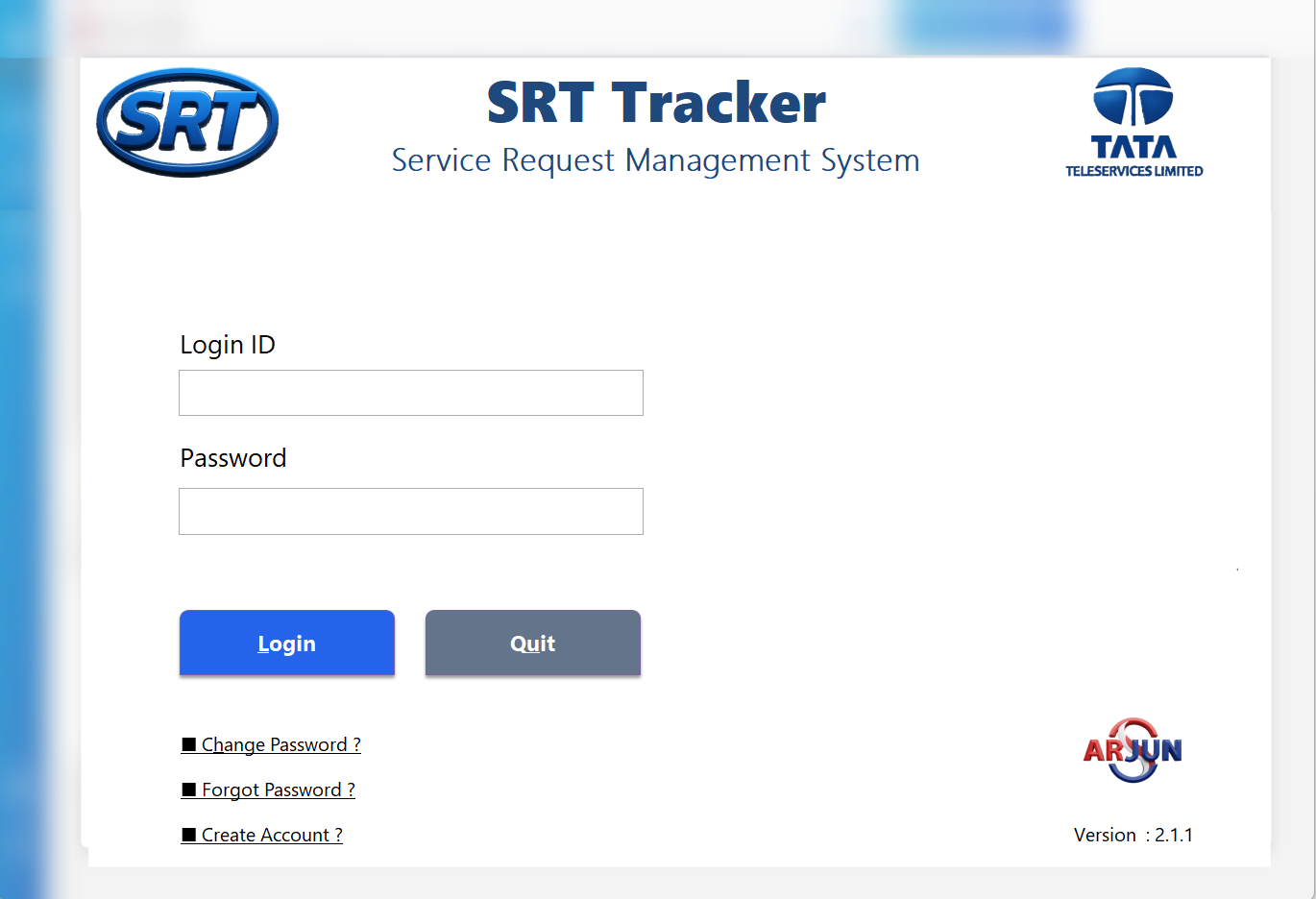
SRT Tracker Login Screen - Secure authentication with demo credentials

Secure Login Interface

Role-based authentication system with password management and new account registration

SRT Main Dashboard - Personalized user dashboard with quick access links

Main Dashboard

Personalized user interface with quick navigation links and administrative controls
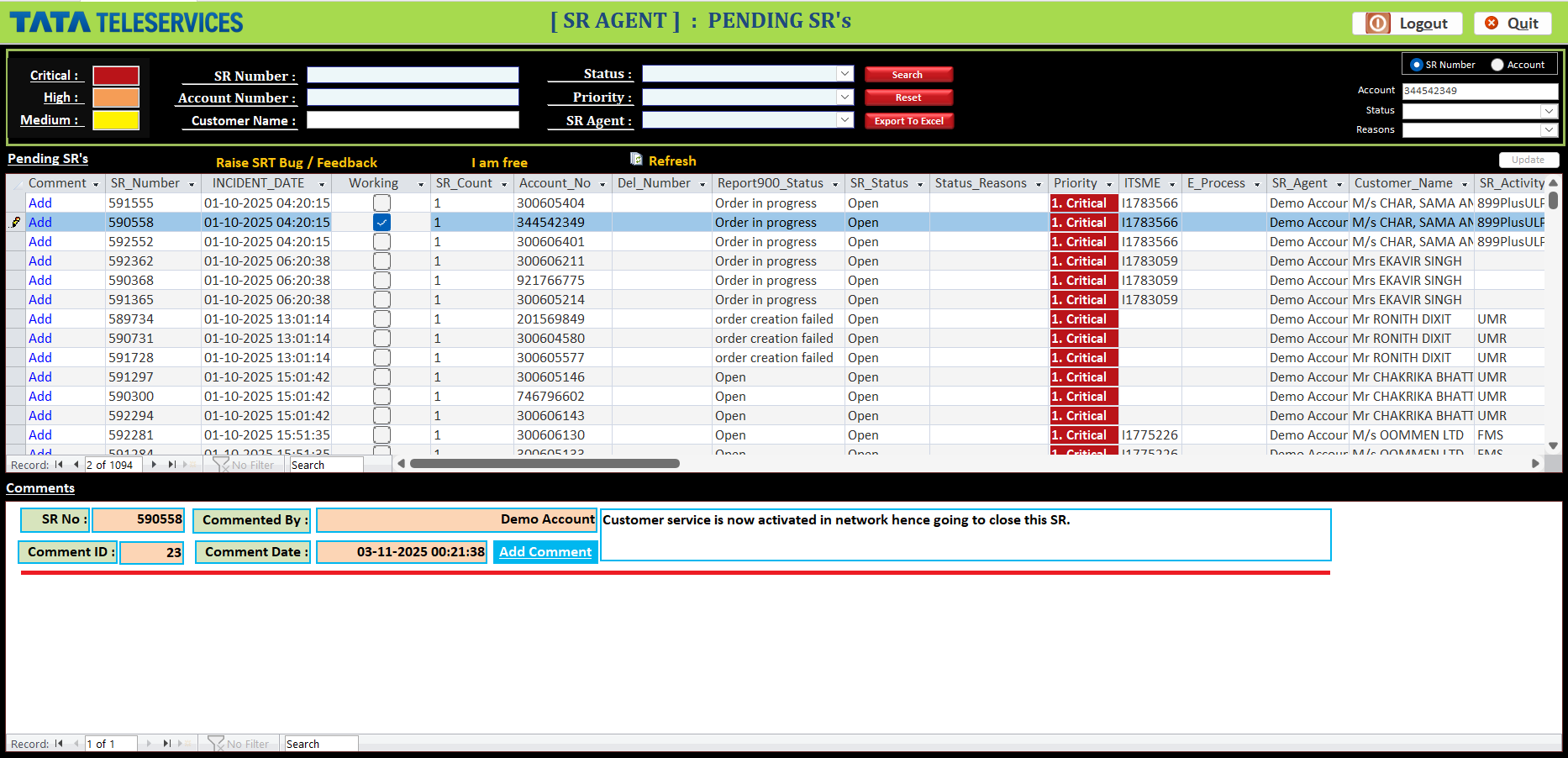
SR Agent Working View - Service request management interface

Service Request Management

Core interface for agents to handle, track, and resolve customer service requests efficiently
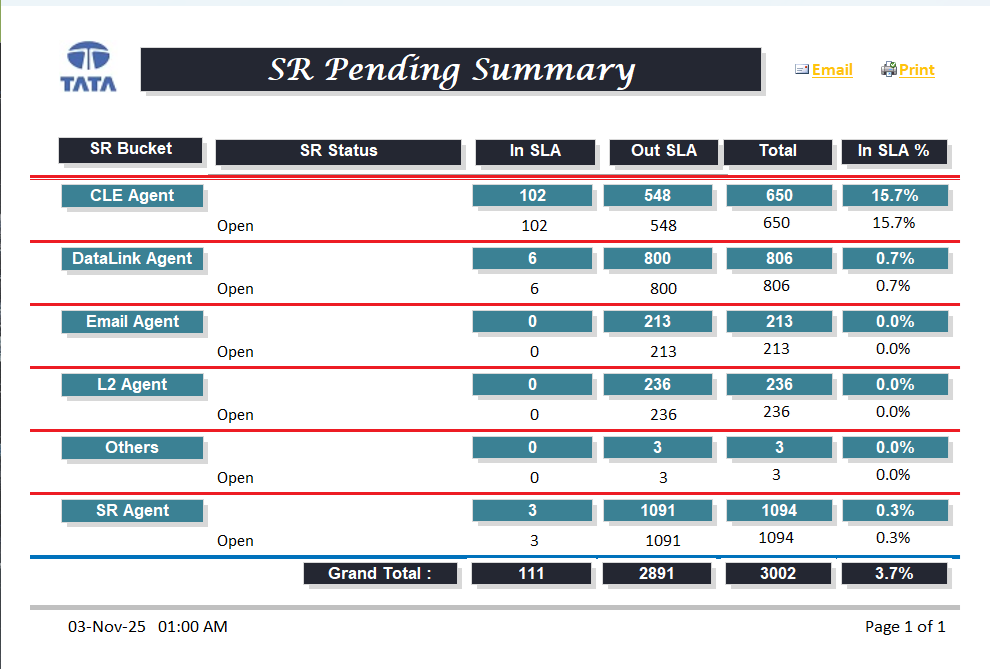
SR Pending Summary - Real-time performance metrics and SLA tracking

Performance Analytics

Real-time SLA monitoring with team-wise performance metrics and compliance tracking

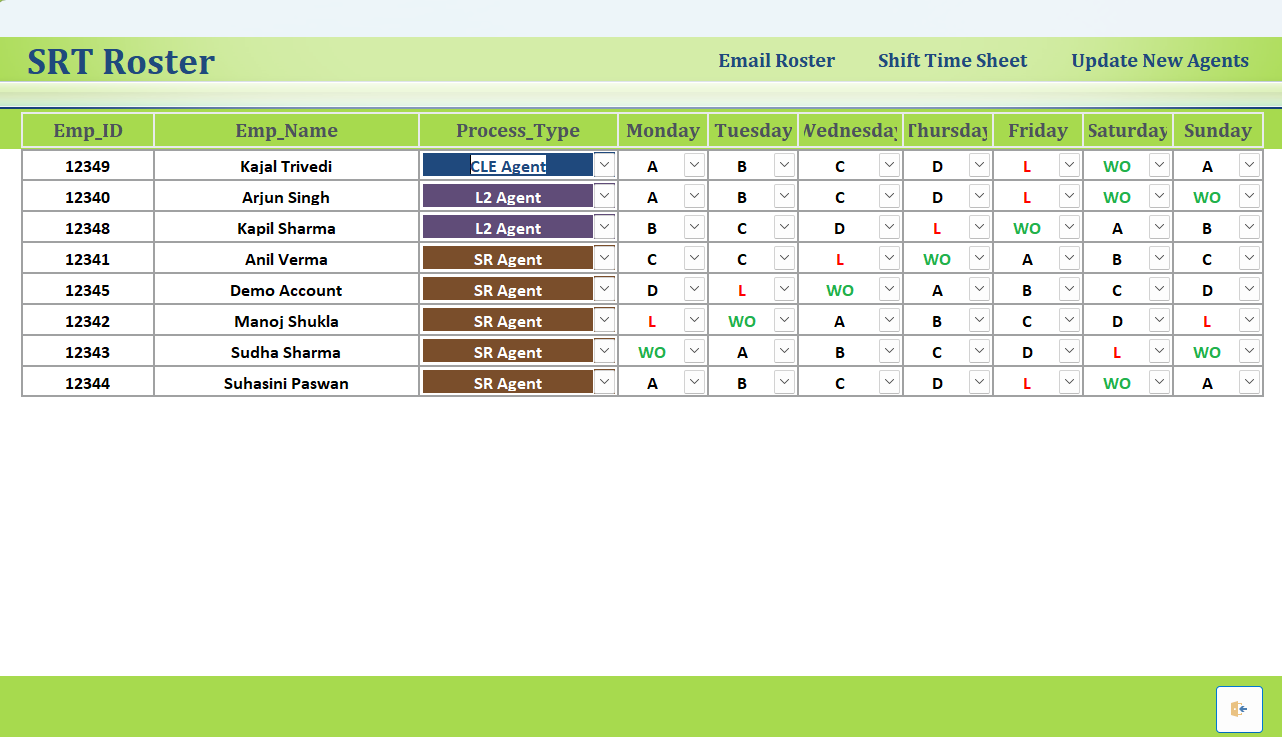
SRT Roster - Employee shift scheduling and workforce management

Shift Roster Management

Comprehensive workforce scheduling with shift patterns, leaves, and week-off management

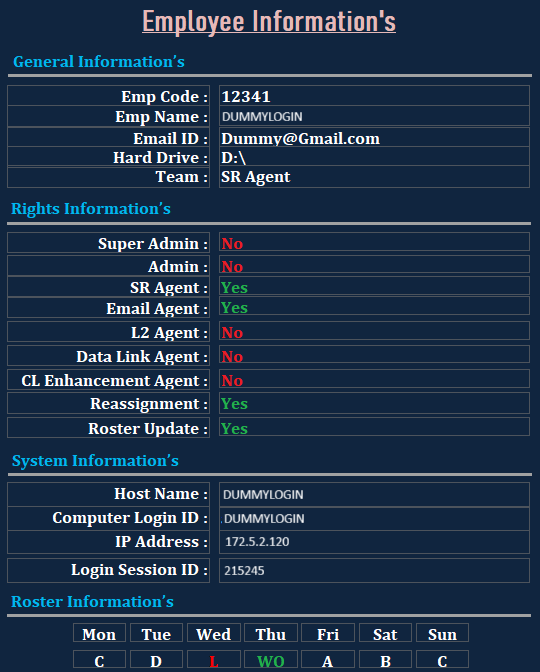
Employee Access Control - Granular permission management system

Role-Based Access Control

Granular permission system defining user roles, rights, and system access levels

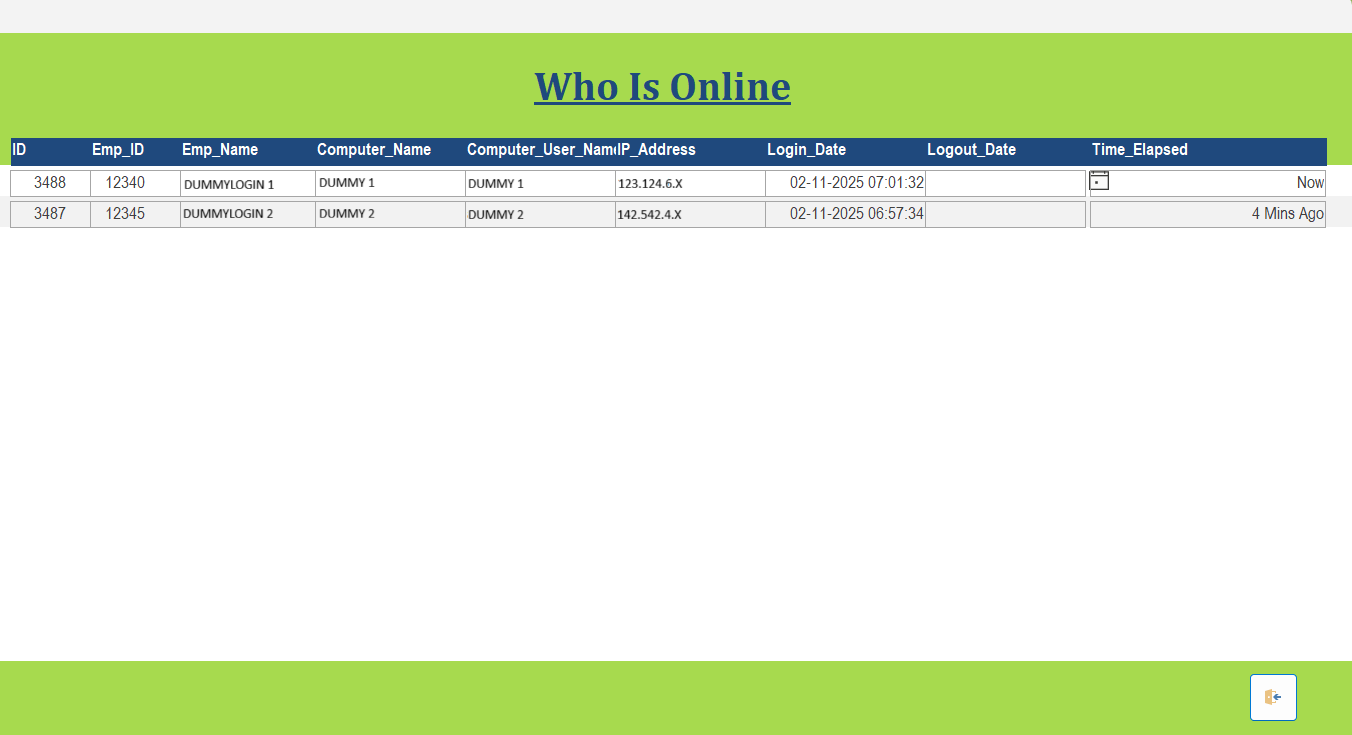
Online Users Monitoring - Live user activity and session tracking

Real-Time User Monitoring

Live tracking of active users, login sessions, and system access patterns

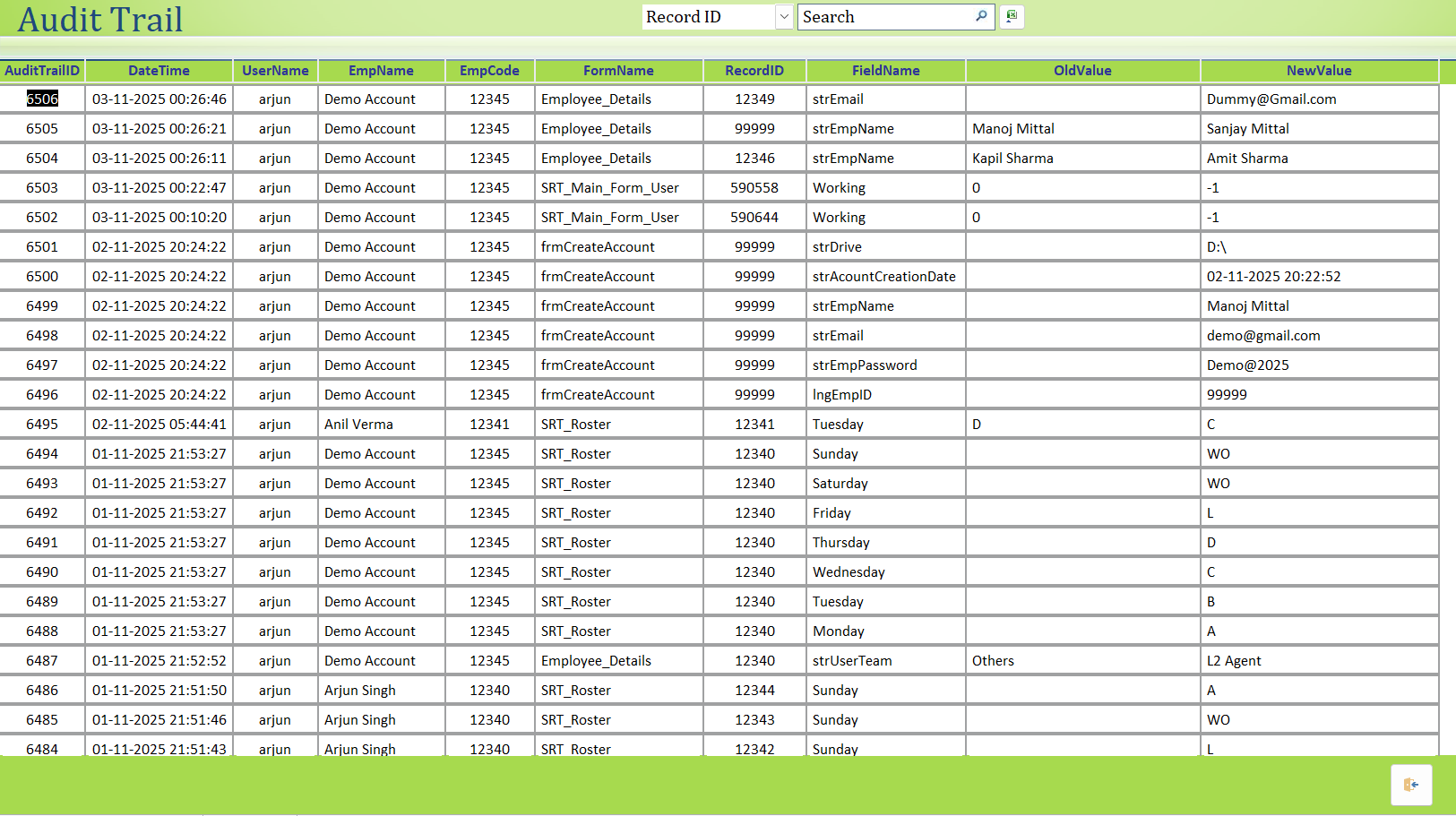
Audit Trail - Complete system activity logging and change tracking

Comprehensive Audit Trail

Detailed logging of all system activities, changes, and user actions for security compliance

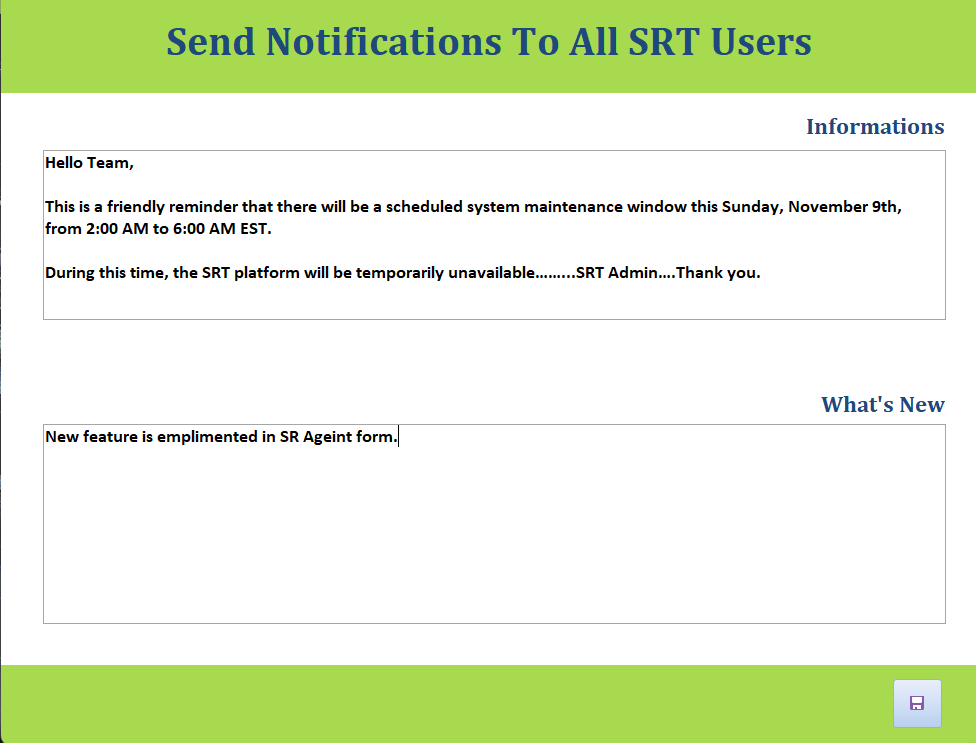
Notification System - Internal messaging and announcement broadcast

Broadcast Notification System

Internal communication platform for system-wide announcements and scheduled alerts

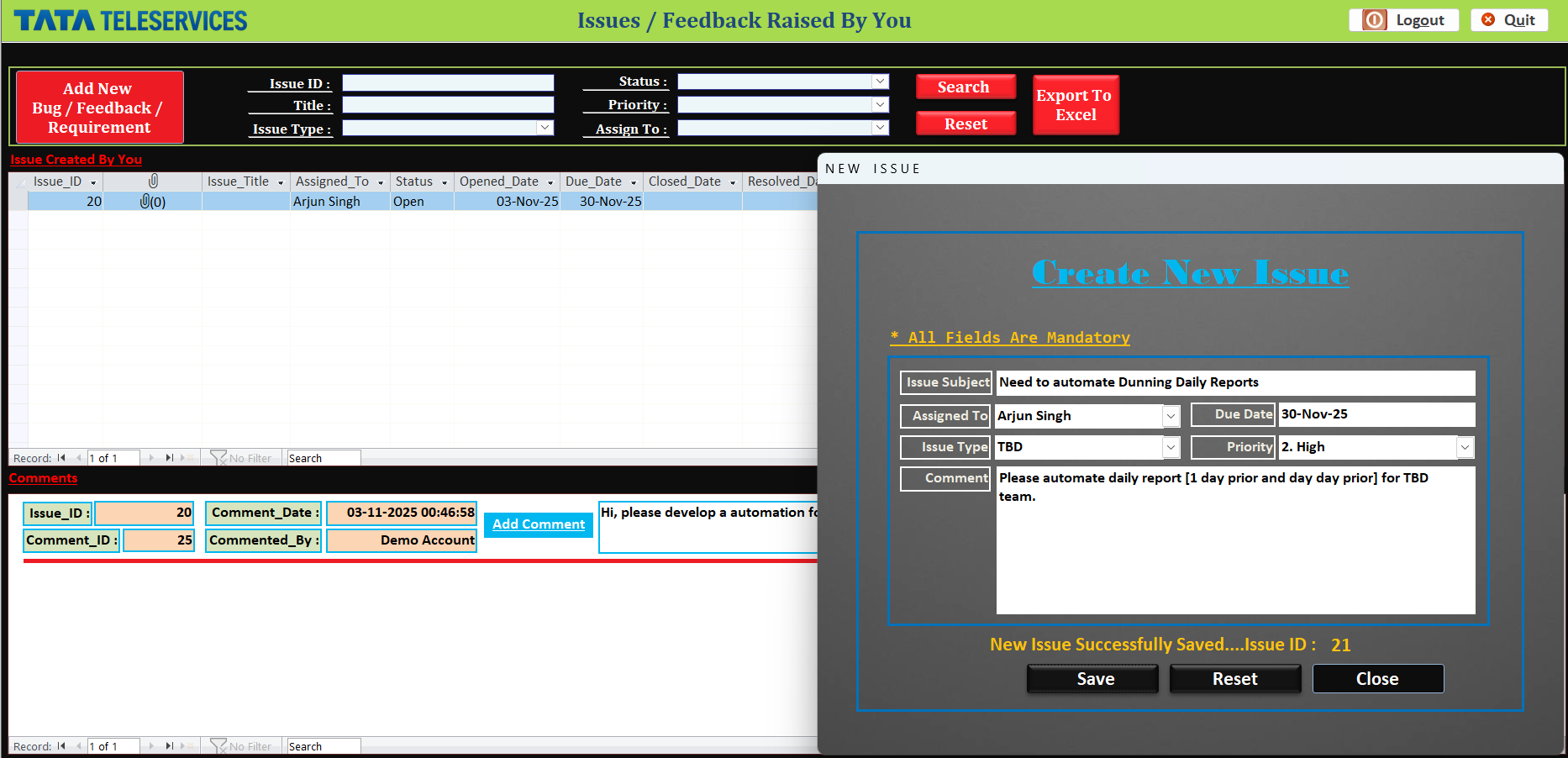
Bug Tracking - Internal issue reporting and resolution workflow

Issue Tracking System

Internal ticketing system for bug reporting, feature requests, and resolution tracking

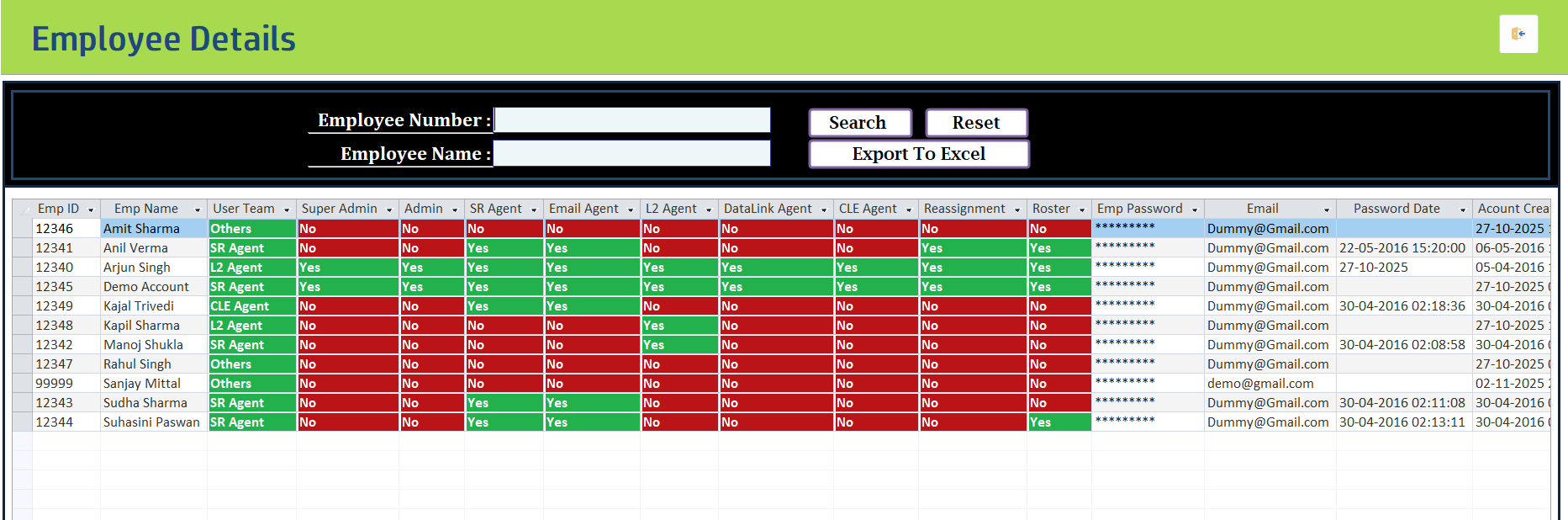
Employee Details Screen - Granular role and access permissions

Employee Access & Roles

Detailed view of employee accounts, assigned user teams, and granular role-based permissions (Super Admin, Agent, etc.).

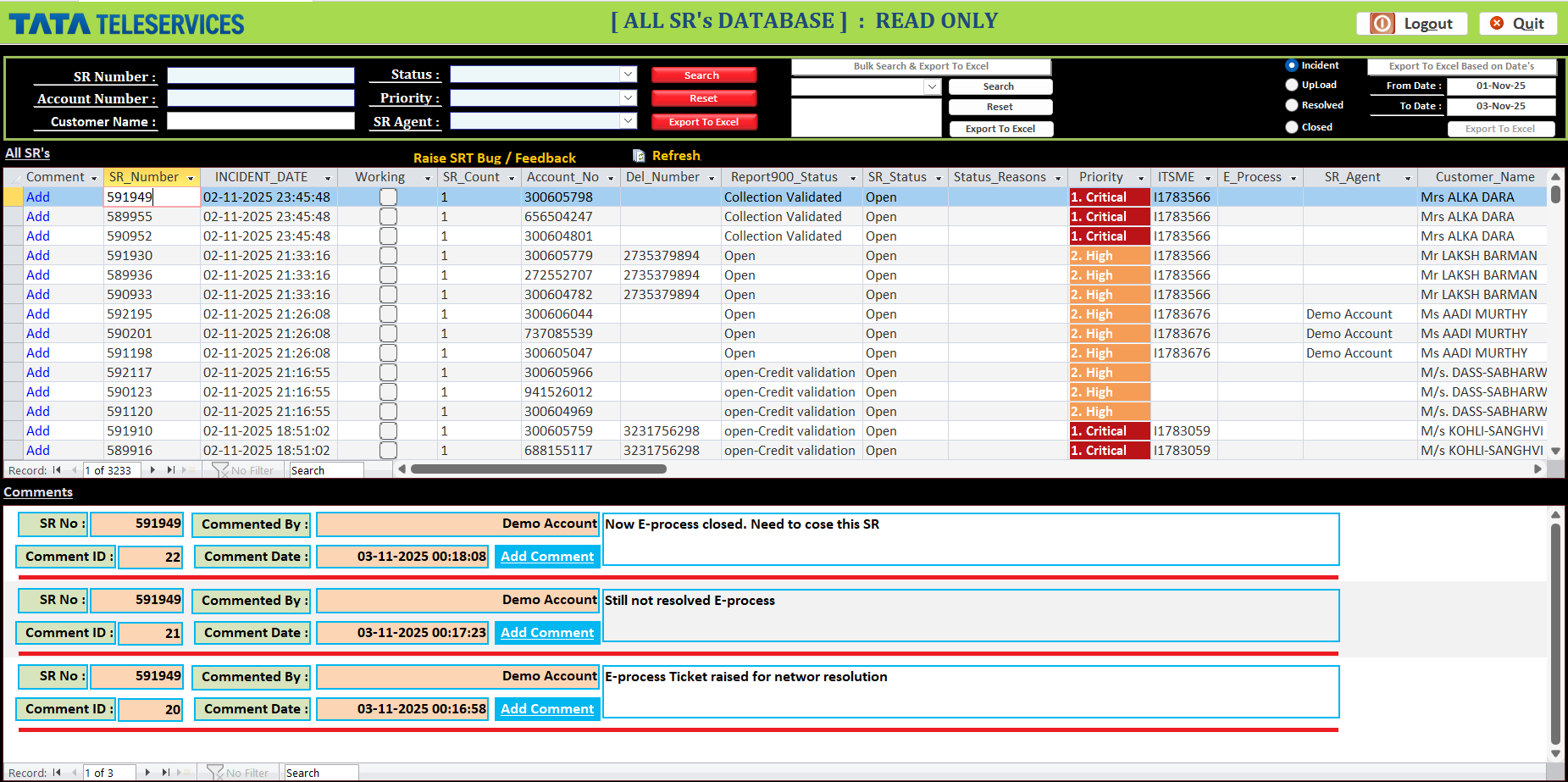
All SRs Database Screen - List of service requests with comments section

Service Request Database & Comments

Comprehensive list of all service requests with priority, status, and an integrated system for adding and viewing request-specific comments.

Click on any screenshot to view in full size. Use ← β†’ arrow keys to navigate.

Ready to Transform Your Task Management?

Choose how you'd like to engage with SRT Tracker

πŸ“₯

Download Demo

Test the full application with sample data

Download Now
🎬

Live Demo

Schedule a personalized walkthrough

Request Demo
πŸ’Ό

Custom Solution

Discuss tailored implementation

Contact Me